"...and a little child shall lead them."
How much more convincing do you need?
Here's the blog itself.
These children are 6 & 7 yr olds. I think they got it.
I'm glad their teacher got it for them.
And their administration must get it too!
Of course, I AM preaching to the choir...or you wouldn't be reading this!
Tuesday, June 5, 2007

Monday, June 4, 2007
371.22 Educational Technology: Videostreaming Resources
Hopefully, your school district has access to educational videostreaming products such as Unitedstreaming and Power Media Plus. They are subscription services, require passwords to access, and are worth e-v-e-r-y p-e-n-n-y your administration pays for their use!
 However, there are other sources for videos that can be used quite successfully in the school setting with proper planning and attention by teachers and librarians. Probably, the best know of these is the video sharing site YouTube which has been discussed in this blog earlier this year. Individuals can create videos and upload them for all to see. There are many, many, many appropriate videos for school use...BUT... my and many other school districts block this resource.
 So, as with many things technological, someone came up with a "work around"-- in this case, a site called TeacherTube, a video sharing site devoted to videos create for and quite often by students and their educational needs. It too has previously been discussed in this blog. Great stuff...you NEED to take a look. And that is possible at school! What a pleasant surprise!
 Hurray! To the rescue comes Blinkx... a video (and audio) search engine. You can put in your search term and get a list of videos from over 130 sources. You can then select the appropriate ones for your needs and can usually play them without additional software or other technology.
 However, there are other sources for videos that can be used quite successfully in the school setting with proper planning and attention by teachers and librarians. Probably, the best know of these is the video sharing site YouTube which has been discussed in this blog earlier this year. Individuals can create videos and upload them for all to see. There are many, many, many appropriate videos for school use...BUT... my and many other school districts block this resource.
 So, as with many things technological, someone came up with a "work around"-- in this case, a site called TeacherTube, a video sharing site devoted to videos create for and quite often by students and their educational needs. It too has previously been discussed in this blog. Great stuff...you NEED to take a look. And that is possible at school! What a pleasant surprise!
There are the traditional news services such as CNN, MSNBC, ABCNews, Fox News and USAToday along with other educational and institutional sites that provide current events, science, social studies and other educationally appropriate video resources. But it would a lot of work to check all of these sources and the dozens of others available on a regular basis.
 Hurray! To the rescue comes Blinkx... a video (and audio) search engine. You can put in your search term and get a list of videos from over 130 sources. You can then select the appropriate ones for your needs and can usually play them without additional software or other technology.
Often, because these videos come from reputable sources, they are not blocked. However, it is possible that the Blinkx site might be blocked, but you could locate the video from home, capture the address, and then be able to see the video from within the school district.
A word to the wise. Be sure you check these videos out before turning them over to students. They are not exclusively educationally appropriate items. Some are user created and uploaded to services such as MySpace, but the Blinkx crawler will find them.
Have a look at all of these..either at school or at home. You will be pleased, I think!
Saturday, June 2, 2007
780.622 Royalty-Free Music Files
In rummaging around for other things, as is my usual style, I found this site for royalty-free music clips that you can use in you PowerPoints, etc.
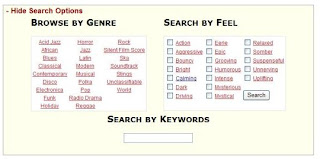 The author of most of these music files also has a blog and among the postings, he will have new music files and give a little background on why he wrote the music or will talk a little what project prompted its creation.
Seems like quite an eclectic, interesting, talented guy. His site is called Incompetech and the tag line is "Ugly website. Brilliant content." Sounds vaguely familiar to the many descriptions often associated with another one of my very favorite websites! His humorous dig at himself already wins points with me. I have emailed him to say so and I will be interested in his response. I'll fill you in later.
And if you want to use these music files for you PowerPoint, here is what I did to accomplish that feat. Others may have a different journey for you to take.
 After you have selected the music you want, right click on this Mp3 symbol and "Save As" to your desktop. Then go to you PPT and go to Insert Movies & Sounds on the first slide.
If you want the music to play throughout the slide show, you have a few things to do in the Slide Show, Custom Animation set up.
1. Be sure the speaker image is highlighted.
2. Go to the Slide Show menu.
3. Click on “Custom Animation."
4. Under the Multimedia tab, check “Play Using Animation Order.”
5. Select “Continue Slide Show” and put the number of slides you want to play thru in the box.
6. Also under the Multimedia tab, click “More Options.”
7. Check “Loop until stopped.”
Be sure the music file is in your PPT folder (you did make a folder before starting to create your PPT, didn't you?) and........... save, save, save!
Monday, May 28, 2007
428.007 Grammar Quiz: Good Review
Can't help it. Grammar is a "thing" with me. I had a great teacher way back in 6th grade who either pounded it into my head (and I didn't feel the pain) or taught it so well, I didn't know I wasn't suppose to be enjoying it! She also shared her wealth of knowledge with me as my 8th grade English teacher as well.
Mrs. Crutchfield was a terrific teacher in many ways...and by the way, she ran the elementary school library. Our 6th grade classroom WAS the library. We sat at library tables. Her desk was a traditional high wooden check out desk. The shelves were along the sides and at the back of the room. I barely remember how other classes came in to get books. I know they did, but it didn't make much of an impression because we were so busy learning in our class.
Anyway, I digress. Grammar AND diagramming sentences were a big part of my school days. I remember diagramming sentences on the board in much the same way math problems were worked on. We had math races and we had diagramming races too! My freshman and senior English teacher Mrs. Briggs often gave us sentences so complicated that by the time we pulled them apart, they looked like chemistry formulas spread out over the board! It - was - F-U-N, and golly gee, we learned...or I guess I should not presume, I learned.
Knowing my grammar and how to take a sentence apart came in handy on many occasions in trying to figure out what I was reading and the gist of that reading. I tried to teach my students for years that if you know what a prepositional phrase is and remove them from the sentence you are trying to decode, there usually isn't much left to determine what the sentence is about. Think about that the next time you practice a TAKS question!
Anyway, to get to point of this post...I took this grammar test and made...
Ta-da! And much of the credit goes to those two wonderful ladies...4 out 7 of my English secondary years were under their care and guidance...and believe me, it made the difference!
Take the quiz...it's fun! It will remind you of those pesky apostrophes and those there-their-they're dilemmas.
Now if I could find a way to explain my spelling issues...I think it is because I was not taught to read phonetically...whole word was my downfall...despite all my father's "night-school-at-home" sessions with that book Why Johnny Can't Read!
Mrs. Crutchfield was a terrific teacher in many ways...and by the way, she ran the elementary school library. Our 6th grade classroom WAS the library. We sat at library tables. Her desk was a traditional high wooden check out desk. The shelves were along the sides and at the back of the room. I barely remember how other classes came in to get books. I know they did, but it didn't make much of an impression because we were so busy learning in our class.
Anyway, I digress. Grammar AND diagramming sentences were a big part of my school days. I remember diagramming sentences on the board in much the same way math problems were worked on. We had math races and we had diagramming races too! My freshman and senior English teacher Mrs. Briggs often gave us sentences so complicated that by the time we pulled them apart, they looked like chemistry formulas spread out over the board! It - was - F-U-N, and golly gee, we learned...or I guess I should not presume, I learned.
Knowing my grammar and how to take a sentence apart came in handy on many occasions in trying to figure out what I was reading and the gist of that reading. I tried to teach my students for years that if you know what a prepositional phrase is and remove them from the sentence you are trying to decode, there usually isn't much left to determine what the sentence is about. Think about that the next time you practice a TAKS question!
Anyway, to get to point of this post...I took this grammar test and made...
Your Language Arts Grade: 100%
Way to go! You know not to trust the MS Grammar Check and you know "no" from "know." Now, go forth and spread the good word (or at least, the proper use of apostrophes).
Are You Gooder at Grammar?
Make a Quiz
Ta-da! And much of the credit goes to those two wonderful ladies...4 out 7 of my English secondary years were under their care and guidance...and believe me, it made the difference!
Take the quiz...it's fun! It will remind you of those pesky apostrophes and those there-their-they're dilemmas.
Now if I could find a way to explain my spelling issues...I think it is because I was not taught to read phonetically...whole word was my downfall...despite all my father's "night-school-at-home" sessions with that book Why Johnny Can't Read!
Sunday, May 27, 2007
370 Teacher Resources: FREE ones!
I know we are all familiar with dot-gov sites like American Memory and Ben's Guide to U.S. Government for Kids. As per usual, I was looking around for something totally different and came upon a nice site that brings many of these dot-gov resources together in one place.
Here is sample list of some of the topics covering a variety of subjects...science, health, geography, math, and on and on!
Oh, btw... FREE, yes indeed. F - R - E - E as in Federal Resources for Educational Excellence. Despite the many woes that are often discussed at length in the blog world, OUR government is on our side with these resources. You must admit that!
Here is sample list of some of the topics covering a variety of subjects...science, health, geography, math, and on and on!
Oh, btw... FREE, yes indeed. F - R - E - E as in Federal Resources for Educational Excellence. Despite the many woes that are often discussed at length in the blog world, OUR government is on our side with these resources. You must admit that!
Tuesday, May 8, 2007
912 U.S Map: Record Your Travels, Family Homes, etc.
Nothing fancy. Simple little website called Visited States Map that lets you check off the states you have visited, lived in, studied, etc. Results are saved as a jpeg, gif, or png.
My Map:
 At this time of the year, I see a lot of use for family trips-- virtually checking off the states as the family travels this summer.
What about using it for family genealogy records? Trace the family's movement across the country and put it in your family record book.
Younger kids? Use it to mark states they have "learned"?
Don't like the automatic color choices? Drop the file into Microsoft Paint or other similar program and choose your colors to meet your needs. A Canadian version is also available, but no world version.
P.S. No Hawaii choice. (Rats, I could add one more!) The map was originally created for RVers to use. And as the site says, it's hard to drive to Hawaii!
My Map:
At this time of the year, I see a lot of use for family trips-- virtually checking off the states as the family travels this summer.What about using it for family genealogy records? Trace the family's movement across the country and put it in your family record book.
Younger kids? Use it to mark states they have "learned"?
Don't like the automatic color choices? Drop the file into Microsoft Paint or other similar program and choose your colors to meet your needs. A Canadian version is also available, but no world version.
P.S. No Hawaii choice. (Rats, I could add one more!) The map was originally created for RVers to use. And as the site says, it's hard to drive to Hawaii!
Monday, May 7, 2007
303.48 Typology of Information: A Survey of Technology Users
A PEW/Internet survey is out that measures Americans and their use of technology based around three things: assets, actions, attitudes. A lot of the information centered around the use of cell phones and of course, that affects my responses. Remember: I am a digital immigrant with an accent-- I don't "do" cell phones!
After reading thru the material, I decided I probably would fall into the Productivity Enhancer group (8% of the population). Technology allows me to do my job effectively and efficiently, keep up with others (I email lots of people I would not visit with regularly), and learn new things (family stuff thru genealogy, an impossible feat without the Internet in my case and of course, everything 2.0)
Here is the pdf version of the survey.
I took the quiz after reading thru the material. My Results: Connector (7% of the population) I guess the non-cell phone part carried me thru. An interesting side fact about being a Connector-- the average age of the respondents who fit in that category is 38, an age I can BARELY remember being, it was soooooo long ago!
What are you?
After reading thru the material, I decided I probably would fall into the Productivity Enhancer group (8% of the population). Technology allows me to do my job effectively and efficiently, keep up with others (I email lots of people I would not visit with regularly), and learn new things (family stuff thru genealogy, an impossible feat without the Internet in my case and of course, everything 2.0)
Here is the pdf version of the survey.
I took the quiz after reading thru the material. My Results: Connector (7% of the population) I guess the non-cell phone part carried me thru. An interesting side fact about being a Connector-- the average age of the respondents who fit in that category is 38, an age I can BARELY remember being, it was soooooo long ago!
What are you?
006.7 Blogging: Basic Information Sources
In hunting around for some other information, I came across this basic blogging information from Technorati. Unfortunately, most of the people in my sphere of influence will not be able to see the information from the site...because it is blocked! So I will pull some of the points to ponder and include them here and then readers can check out the whole page of information at another time and place.
Point of clarity: Blog and weblog are interchangeable terms.
The difference between a web site and a blog:
"A weblog is a website that is updated frequently, most often displaying its material in journal-like chronological dated entries or posts. Most blogs allow readers to post comments..."
Common misconception about blogs:
"The main misconception about blogs is that they are only personal diaries...Blog topics include political commentary, product reviews, scientific endeavors, and any area of information where people have a deep expertise and a desire to express it. "
Why blogs are important:
"...Instead of primarily being passive consumers of information, more and more Internet users are becoming active participants. Weblogs allow everyone to have a voice."
Also included is information about blogrolls, RSS feeds and readers, relationship between blogs and journalism, and linking.
P.S. What is Technorati? The largest search engine for blogs!
And if you do want to read lots of background information about blogs that is available to all readers (at least I hope it is!) go to Wikipedia.
Point of clarity: Blog and weblog are interchangeable terms.
The difference between a web site and a blog:
"A weblog is a website that is updated frequently, most often displaying its material in journal-like chronological dated entries or posts. Most blogs allow readers to post comments..."
Common misconception about blogs:
"The main misconception about blogs is that they are only personal diaries...Blog topics include political commentary, product reviews, scientific endeavors, and any area of information where people have a deep expertise and a desire to express it. "
Why blogs are important:
"...Instead of primarily being passive consumers of information, more and more Internet users are becoming active participants. Weblogs allow everyone to have a voice."
Also included is information about blogrolls, RSS feeds and readers, relationship between blogs and journalism, and linking.
P.S. What is Technorati? The largest search engine for blogs!
And if you do want to read lots of background information about blogs that is available to all readers (at least I hope it is!) go to Wikipedia.
Friday, May 4, 2007
006.7 Blogging & Podcasting: They Practice What They Preach
 Sub-title: For Aspiring New Media Titans.
An old format to share news and information about new formats. This magazine has been out a month. You can receive it in one of 3 ways...a printed edition for a subscription fee or a digital or podcast edition for free!
Several useful articles for upcoming trainings...and some more information for the "Why Blog" virtual (as opposed to vertical) file folder:
Blogging is Just Kid's Stuff by Shel Isreal; Basic Podcasts Setups and Formats; Where Do We Go from Here?
The cover article is about Robert Scoble who left Microsoft in 2006 to work with Podtech Network. Interesting reading. And yes, there are advertisements, some with sound!
Might be fun to follow this new resource.
Thursday, May 3, 2007
371.22 Good YA Books Workshop: Social Networking in Action
We have spent a wonderful day talking about books and the web!
The participants say:
"fantastic!"
"one of the best..."
"I am excited about learning how to blog"
"I want to try podcasting"
"Playaways!"
"I learned a whole new language...digital immigrants who can speak [Web 2.]!! "
"I learned that we need to get our district to let our students do some social networking...AT SCHOOL."
***************************
I spent the day with 15 teachers, librarians, and a library assistant (yes!) talking about YA Books in the Web 2.0 setting. We talked about some great books, some fun books, some reference books...that meet the needs on YAs on many levels!
To assist them in promoting and using these books we looked at websites from publishers and educational entities, we looked at author sites and blogs, we looked at blogs for books and FOR kids! We looked at kids' writing online!
We dealt with the typical issues that are attached to YA books and adult books read by YAs. There are no easy answers, but we all agreed that all the books presented or mentioned had value and purpose, despite what objections may be raised. We looked at ways of preventing controversy and still benefitting from the essence of the books.
We took a few minutes to look behind the scenes of a blog and did a quick post (the comments above were shouted out and typed and posted within 5 minutes.)
Perhaps, the most poignant (and even saddest) moments of the day were spent discussing HOW important all of this IS to and for the kids...and how much work we all have ahead of us in convincing the adults who lead and direct us, or even work beside us, of all this social networking, whether it is about books, math problems, current events, or life in general.
We shared, we networked, we bonded. And we laughed...a lot!
The participants say:
"fantastic!"
"one of the best..."
"I am excited about learning how to blog"
"I want to try podcasting"
"Playaways!"
"I learned a whole new language...digital immigrants who can speak [Web 2.]!! "
"I learned that we need to get our district to let our students do some social networking...AT SCHOOL."
***************************
I spent the day with 15 teachers, librarians, and a library assistant (yes!) talking about YA Books in the Web 2.0 setting. We talked about some great books, some fun books, some reference books...that meet the needs on YAs on many levels!
To assist them in promoting and using these books we looked at websites from publishers and educational entities, we looked at author sites and blogs, we looked at blogs for books and FOR kids! We looked at kids' writing online!
We dealt with the typical issues that are attached to YA books and adult books read by YAs. There are no easy answers, but we all agreed that all the books presented or mentioned had value and purpose, despite what objections may be raised. We looked at ways of preventing controversy and still benefitting from the essence of the books.
We took a few minutes to look behind the scenes of a blog and did a quick post (the comments above were shouted out and typed and posted within 5 minutes.)
Perhaps, the most poignant (and even saddest) moments of the day were spent discussing HOW important all of this IS to and for the kids...and how much work we all have ahead of us in convincing the adults who lead and direct us, or even work beside us, of all this social networking, whether it is about books, math problems, current events, or life in general.
We shared, we networked, we bonded. And we laughed...a lot!
Subscribe to:
Posts (Atom)