I love the Web. I love all of the creative people and things I get to see because some creative person put something together and then some other creative person made a video of it and handed it over to another creative person to put it up on the Web so I could see.
Just wish all the students and teachers in my sphere of influence could see everything I see.
But for the ones who can away from school, I present the Vegetable Orchestra
I know there is science involved in the creation of the instruments...even a vocabulary review of the vegetables...how about a compare and contrast of these instruments with the real ones.
What about pairing it up with Orchestranimals by Van Kampen or Scott Gustafson's Animal Orchestra or Young Person's Guide to Music (with accompanying CD)
Maybe graphing (spreadsheet?) how many different instruments are made from carrots, gourds, squash...
The video is a tad long, but PLEASE hang on till the end ...the bell pepper horn up close is worth the wait!
I bet kids would remember more general information about the orchestra after viewing this!
P.S. Not sure creation of these instruments by young children would be possible...the tools are pretty wicked!
PPS. ok , did a little research to see if there were other versions that might come thru at school...
same group, but is narrated by a member (3+ minutes) maybe it will show? AVAILABLE in District!...just checked.
but no listings for TeacherTube or Google videos. Rats!
Showing posts with label Music. Show all posts
Showing posts with label Music. Show all posts
Wednesday, December 5, 2007

Tuesday, September 18, 2007
005. 2 ANIMOTO: Free Video Web Application
Oh, boy! I found another fun little FREE program!
Make a movie out of your photos in less than five minutes...no kidding...with music and all kinds of flashy moves!
ANIMOTO
http://animoto.com/play/a462c2d1fe46475b480b18b8b6e7f6e3
this link is the movie I made to learn the process using the only batch of pictures I had handy...hence the reason for it only being 26 seconds long.
If it doesn't play because of a password issue, try one of theirs...I saw a cool little movie about skateboarding in the preview pane. It is a simple 1 - 2 - 3 process.
Of course, at this moment, I am not sure it will be available inside my school district...guess I will find out tomorrow.
All the interesting techniques with the pictures, Animoto did that...it does ask you to highlight a few of the pictures for extra punch...and you can choose one of their music files...not too many to my taste, but, hey...it's free!! and it does all the work for you...so I am not complaining! (You can use your own music file--be sure you are not violating copyright!)
Go have some fun...it is E-A-S-Y.
P.S. It took me longer to create this post than it did my little movie...of course typing can be a bit of a problem when your space bar all of a sudden decides to stick! o, brother...technology is fickle, isn't it?
Make a movie out of your photos in less than five minutes...no kidding...with music and all kinds of flashy moves!
ANIMOTO
http://animoto.com/play/a462c2d1fe46475b480b18b8b6e7f6e3
this link is the movie I made to learn the process using the only batch of pictures I had handy...hence the reason for it only being 26 seconds long.
If it doesn't play because of a password issue, try one of theirs...I saw a cool little movie about skateboarding in the preview pane. It is a simple 1 - 2 - 3 process.
Of course, at this moment, I am not sure it will be available inside my school district...guess I will find out tomorrow.
All the interesting techniques with the pictures, Animoto did that...it does ask you to highlight a few of the pictures for extra punch...and you can choose one of their music files...not too many to my taste, but, hey...it's free!! and it does all the work for you...so I am not complaining! (You can use your own music file--be sure you are not violating copyright!)
Go have some fun...it is E-A-S-Y.
P.S. It took me longer to create this post than it did my little movie...of course typing can be a bit of a problem when your space bar all of a sudden decides to stick! o, brother...technology is fickle, isn't it?
Friday, July 13, 2007
346.7304 Free Doesn't Always Mean Free to Use: Copyright Issues on the Web
With summer more than half over, all of us will begin thinking about lessons and projects sooner than later and will be looking for resources to use in said items. Not only will we come across print information, but we will also stumble on pictures, sounds, podcasts, music and videos that may be appropriate and useful in making our points... and many of these resources may be "free"...as in it will not cost us $ to download.
STOP...as the saying goes (or at least my paraphrasing of such saying)...nothing in life is really "free!" Look at the small print...and if at first you don't see it...look again just to be sure. There may be COPYRIGHT issues attached to the resource...i.e. the owner of the material may have strings attached to the use of the material.
Case in point: Free Children's Music.com...a website full of just what its title implies...all kinds of children's songs and dittys...in Mp3 format...easy for downloading. Cute, colorful website just screaming "Bring the kids and listen!" The home page states:
At the bottom of the home page is an even more important statement "Hey can I use this music to..."
The website author goes on to explain that it is not his music so he can not grant use. Anyone wanting to use it in the ways listed above should contact the actual owner of the music. Yes, email the artist and ask if the music can be put on in PPT, on a web page, in a photostory presentation, etc.
The ability to download the file does not give us the right to use it the way we want.
And those stacks of CDs we all have with all the "perfect background" music for that special welcome-back-to-school PPT program or campus TV news program aren't "free" for the using either...unless the artist/owner states so!!
Be careful...our kids are watching!
STOP...as the saying goes (or at least my paraphrasing of such saying)...nothing in life is really "free!" Look at the small print...and if at first you don't see it...look again just to be sure. There may be COPYRIGHT issues attached to the resource...i.e. the owner of the material may have strings attached to the use of the material.
Case in point: Free Children's Music.com...a website full of just what its title implies...all kinds of children's songs and dittys...in Mp3 format...easy for downloading. Cute, colorful website just screaming "Bring the kids and listen!" The home page states:
This is the place for great free songs for kids! Download all the terrific
children's songs you want to. There are no guarantees how long any of them will
be here, so grab them while you can. Have fun exploring!! And don't forget to
click on the artists' names to visit their web sites!
At the bottom of the home page is an even more important statement "Hey can I use this music to..."
It is intended to be downloaded and listened to on computers, MP3 players,
custom CDs for personal listening, etc. It is NOT intended to be played on your
web site, mixed with video or graphics and posted on another web site, played in
public as warmup music for a paying audience, burned to CDs intended for resale,
used on TV shows, etc.
The website author goes on to explain that it is not his music so he can not grant use. Anyone wanting to use it in the ways listed above should contact the actual owner of the music. Yes, email the artist and ask if the music can be put on in PPT, on a web page, in a photostory presentation, etc.
The ability to download the file does not give us the right to use it the way we want.
And those stacks of CDs we all have with all the "perfect background" music for that special welcome-back-to-school PPT program or campus TV news program aren't "free" for the using either...unless the artist/owner states so!!
Be careful...our kids are watching!
Saturday, June 2, 2007
780.622 Royalty-Free Music Files
In rummaging around for other things, as is my usual style, I found this site for royalty-free music clips that you can use in you PowerPoints, etc.
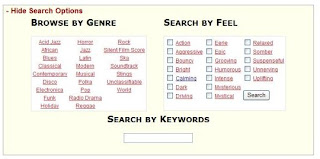 The author of most of these music files also has a blog and among the postings, he will have new music files and give a little background on why he wrote the music or will talk a little what project prompted its creation.
Seems like quite an eclectic, interesting, talented guy. His site is called Incompetech and the tag line is "Ugly website. Brilliant content." Sounds vaguely familiar to the many descriptions often associated with another one of my very favorite websites! His humorous dig at himself already wins points with me. I have emailed him to say so and I will be interested in his response. I'll fill you in later.
And if you want to use these music files for you PowerPoint, here is what I did to accomplish that feat. Others may have a different journey for you to take.
 After you have selected the music you want, right click on this Mp3 symbol and "Save As" to your desktop. Then go to you PPT and go to Insert Movies & Sounds on the first slide.
If you want the music to play throughout the slide show, you have a few things to do in the Slide Show, Custom Animation set up.
1. Be sure the speaker image is highlighted.
2. Go to the Slide Show menu.
3. Click on “Custom Animation."
4. Under the Multimedia tab, check “Play Using Animation Order.”
5. Select “Continue Slide Show” and put the number of slides you want to play thru in the box.
6. Also under the Multimedia tab, click “More Options.”
7. Check “Loop until stopped.”
Be sure the music file is in your PPT folder (you did make a folder before starting to create your PPT, didn't you?) and........... save, save, save!
Subscribe to:
Posts (Atom)